Host Serial Receive Block Description
This block is used to receive a data stream transmitted via a COM serial port, which serves for communication between the simulation in Simulink and external devices, e.g., a board with an STM32 microcontroller.
This block cannot be implemented in a model deployed to a microcontroller.
This family of blocks cannot be implemented in a model deployed to a microcontroller. It is intended exclusively for simulation that takes place entirely on a PC and requires a connection to an external device via a COM serial port. Data received through transmission can be used for visualization in Simulink or to control an external device. Data sent from Simulink can be used to control an external device or to test control algorithms within the simulation.
To use the block, you must first configure the host serial port using the Host Serial Setup block.
Table of Contents
Inputs
This block does not have any inputs.
Outputs
| Output Name | Type | Description |
|---|---|---|
| Data | uint8 | Returned raw data received from the serial port. |
Block Parameters
| Parameter | Description |
|---|---|
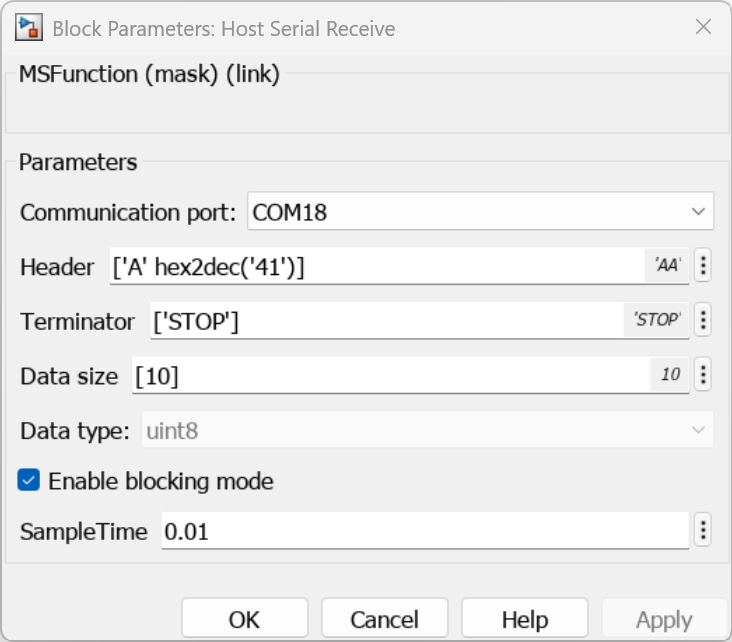
| Communication port | Selection of the serial port (COM) responsible for receiving data. |
| Header | A sequence of bytes that starts and identifies a valid data frame. |
| Terminator | A sequence of characters or bytes defining the end of the received data frame. |
| Data size | Defines the size (number of elements) of the data buffer in a single packet. This size is fixed; it is not possible to receive data of a smaller size. |
| Data type | Output data type (default uint8). |
| Enable blocking-mode | In normal operating mode, the Simulink simulation depends on the computation execution speed. To make the simulation duration dependent on real time, this parameter must be checked. In this scenario, the simulation will wait for data availability on the serial port and receive it at a rate dependent on the SampleTime parameter. |
| SampleTime | The interval for receiving data from the serial port. If the transmitting device sends data at a rate higher than the specified time, the data will be stored in the buffer and received in the next function execution cycle, which will lead to receiving data with a delay. |
To make the simulation duration dependent on real time, the Enable blocking-mode parameter must be checked. Otherwise, the simulation duration will depend on the computing power of the computer running it.
The Header and Terminator parameters accept byte value arrays in MATLAB notation, which define the start and end of the frame. Characters can be entered directly in single quotes or as numerical values using conversion functions:
- Mixed format (array): Entries are enclosed in square brackets, separating elements with a space or a comma, e.g.,
['A' hex2dec('41')]. - ASCII characters: Single characters are defined in single quotes, e.g.,
'A'(which corresponds to the value0x41). - Hex/Dec values: To enter pure hexadecimal values, use the
hex2dec('hex_value')function, e.g.,hex2dec('41')will return the value65in the decimal system. Do not type the0xprefix before the hexadecimal value, as this will cause an error in interpreting the value.
CubeMX Configuration for a Given MCU Model
It is not possible to configure parameters in CubeMX for this block.