Custom Code Block Description
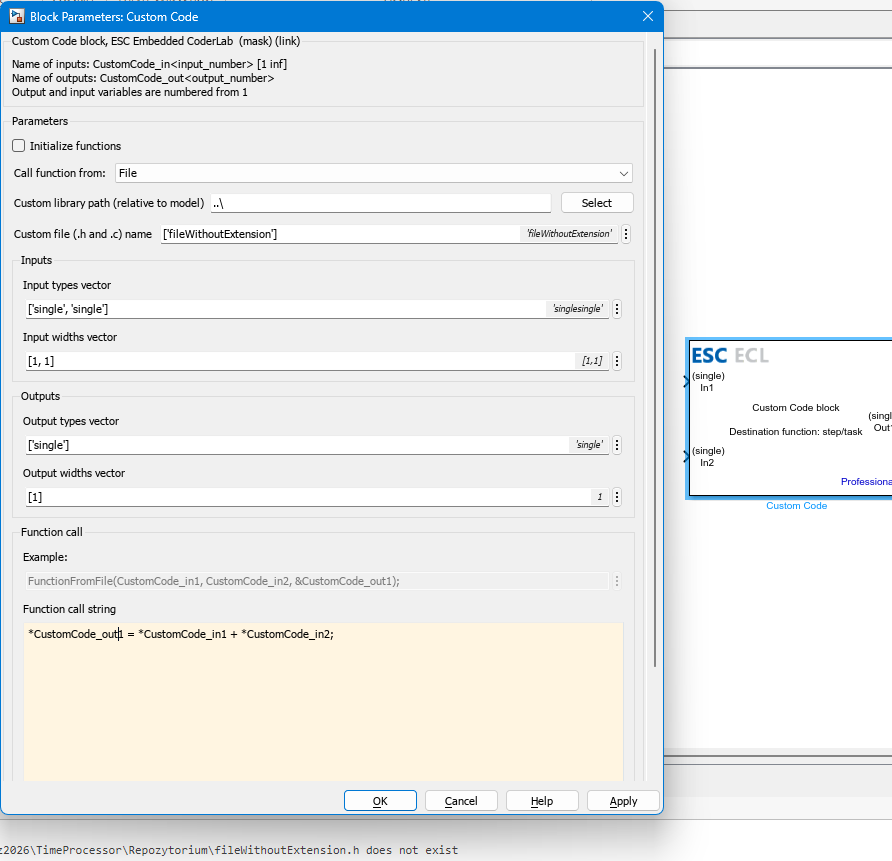
This block is used to execute custom C code within a Simulink model. The code can be entered directly into the Function call string parameter or included via an external library. There is an option to add inputs and outputs to the block, making them available within the C code.
Table of Contents
Inputs
The inputs for this block depend on its parameter settings. The input data type is configured via the Input types vector parameter, while the number and width of the inputs are defined in the Input widths vector parameter.
Input values are accessible in the C code as pointer variables named CustomCode_inN, where N represents the sequential input number (e.g., CustomCode_in1, CustomCode_in2, etc.). An input can also be an array if its corresponding size in the Input widths vector parameter is greater than 1. In such cases, array elements can be referenced in the C code using an index, for example, CustomCode_in1[0], CustomCode_in1[1], etc.
Outputs
The outputs for this block depend on its parameter settings. The output data type is configured via the Output types vector parameter, while the number and width of the outputs are defined in the Output widths vector parameter.
Outputs are accessible in the C code as pointer variables named CustomCode_outN, where N represents the sequential output number (e.g., CustomCode_out1, CustomCode_out2, etc.). An output can also be an array if its corresponding size in the Output widths vector parameter is greater than 1. In such cases, array elements can be referenced in the C code using an index, for example, CustomCode_out1[0], CustomCode_out1[1], etc.
When an input or output width is greater than 1, it should be handled as a vector.
Block Parameters
| Parameter | Description |
|---|---|
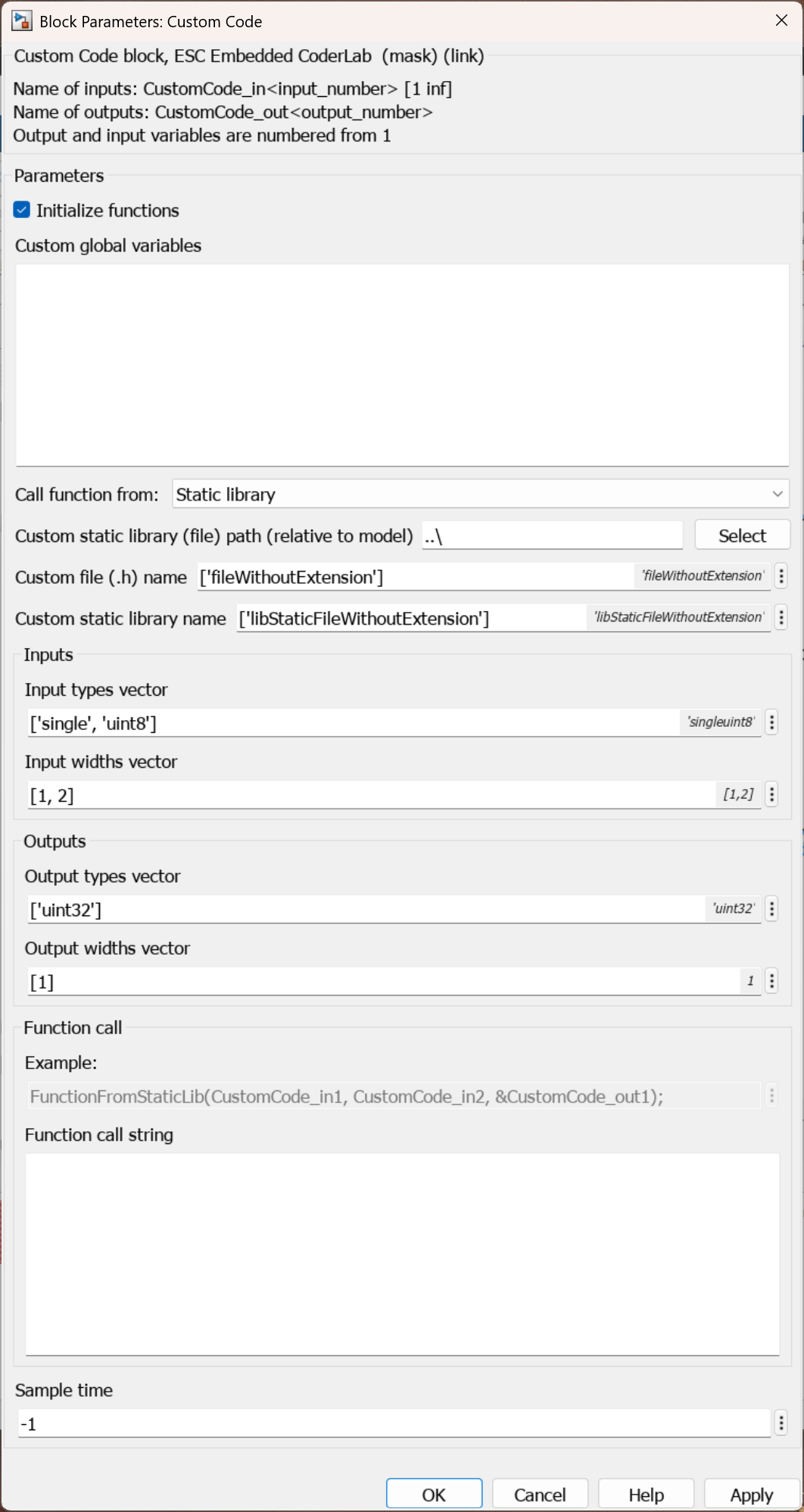
| Initialize functions | Enabling this parameter ensures that the code placed in the Function call string runs only once during the initialization phase of the program. It also unlocks the Custom global variables field. |
| Custom global variables | Conditional Parameter Custom global variables that will be available in the C code and across other Custom Code blocks. This parameter is accessible only when the Initialize functions option is enabled. |
| Call function from | Selects the source from which the function should be invoked:Disable – option is disabled.File – from a source file.Static library – from a static library. |
Parameters when Call function from is set to File
File| Parameter | Description |
|---|---|
| Custom library path (relative to model) | Conditional Parameter The path to the header file, relative to the model. Enter the path manually or select it using the Select button. This parameter is accessible when the Call function from option is set to File. |
| Custom file (.h and .c) name | Conditional Parameter The name of the .h header and .c source files; both must share identical names. Enter it without extensions, using the format ['filename_without_extension']. This parameter is accessible when the Call function from option is set to File. |
Parameters when Call function from is set to Static library
Static library| Parameter | Description |
|---|---|
| Custom static library (file) path (relative to model) | Conditional Parameter The path to the static library file, relative to the model. Enter the path manually or select it using the Select button. This parameter is accessible when the Call function from option is set to Static library. |
| Custom file (.h) name | Conditional Parameter The name of the .h header file contained within the static library. Enter it without extensions, using the format ['filename_without_extension']. This parameter is accessible when the Call function from option is set to Static library. |
| Custom static library name | Conditional Parameter The name of the static library (with a .a extension) from which the function will be called. Enter it without extensions, using the format ['library_name_without_extension']. This parameter is accessible when the Call function from option is set to Static library. |
When invoking a function from a static library, the .h header file must reside in the exact same directory as the .a static library file.
| Parameter | Description |
|---|---|
| Input types vector | A vector specifying the data types for the inputs. The number of listed types must match the number of input ports. Use the following format: ['input_type_1', 'input_type_2', ...] |
| Input widths vector | A vector specifying the number and width of the inputs. The number of listed values must match the number of input ports. Use the following format: ['input_width_1', 'input_width_2', ...] |
| Output types vector | A vector specifying the data types for the outputs. The number of listed types must match the number of output ports. Use the following format: ['output_type_1', 'output_type_2', ...] |
| Output widths vector | A vector specifying the number and width of the outputs. The number of listed values must match the number of output ports. Use the following format: ['output_width_1', 'output_width_2', ...] |
| Function call string | The code field for entering custom C statements. This can be inline code or a call to an external function defined in the header files or static libraries provided above. |
| Sample time [s] | The refresh execution period of the function. |
CubeMX Configuration for a Given MCU Model
This block does not require any specific CubeMX hardware configuration for the MCU model.
Examples
Below is an example demonstrating how to use the block to sum two input variables and route the result to an output port.