RTC Alarm Get Block Description
The RTC Alarm block operating in Get mode enables reading the currently configured alarm settings from the Real-Time Clock (RTC). To configure or modify an alarm, use the RTC Alarm Set Block. The block responsible for handling the generated interrupt signal is detailed on the RTC Alarm IRQ subpage.
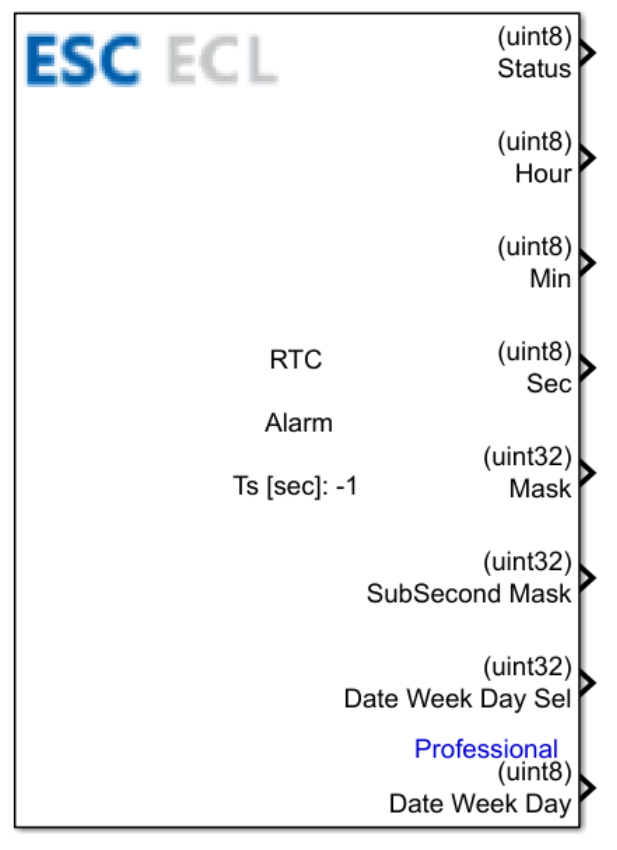
Table of Contents
Inputs
This block has no inputs.
Outputs
| Output Name | Type | Description |
|---|---|---|
| Status | uint8 | The operational status of the RTC alarm read routing:1 – alarm values read successfully0 – failed to execute alarm read query |
| Hour | uint8 | The configured hour parameter extracted from the active RTC alarm. |
| Min | uint8 | The configured minute parameter extracted from the active RTC alarm. |
| Sec | uint8 | The configured second parameter extracted from the active RTC alarm. |
| Mask | uint32 | The main time and date mask bitfield configuration. Maps directly to the masking bits within the hardware RTC_ALRMAR (or RTC_ALRMBR) registers. Setting a specific bit to 1 forces the hardware comparator to ignore that time unit when validating the alarm trigger.Bitfield Combinations: 0x00000080 (bit MSK1) – masks seconds validation.0x00008000 (bit MSK2) – masks minutes validation.0x00800000 (bit MSK3) – masks hours validation.0x80000000 (bit MSK4) – masks date/day validation (month or week day variant). |
| SubSecond Mask | uint32 | The subseconds fractional bitfield mask configuration. Maps directly to the MASKSS[3:0] bits within the hardware RTC_ALRMASSR (or RTC_ALRMBSSR) registers. Dictates the range of least significant bits in the fractional down-counter ignored during evaluation.Values: 0x00000000 – masking inactive; all fractional subsecond register bits are matched.0x01000000 to 0x0E000000 – sequential bit mask scaling spanning ranges from position [0] up to [14:0].0x0F000000 – complete mask coverage; subseconds matching constraints are ignored entirely. |
| Date WeekDay Sel | uint32 | Day type operational mode evaluation filter selector. Maps directly to the WDSEL bit within the hardware RTC_ALRMAR (or RTC_ALRMBR) registers. Controls how the underlying field value matches temporal parameters.Values: 0x00000000 – WDSEL bit cleared to 0 (interprets value directly as a calendar day of the month).0x40000000 – WDSEL bit asserted to 1 (interprets value directly as a dedicated day of the week). |
| Date Week Day | uint32 | The raw day register target value matched for the active alarm event. Maps to the tens/units bits DT[1:0] / DU[3:0] (for calendar month day mode) or the raw lower units bits DU[2:0] (for week day mode) inside the hardware RTC_ALRMAR (or RTC_ALRMBR) registers.Values: For DATE mode: formatted BCD values spanning from 0x01 to 0x31 (mapped at register index [29:24]).For WEEKDAY mode: formatted BCD values spanning from 0x01 (Monday) to 0x07 (Sunday) (mapped at register index [26:24]). |
Block Parameters
| Parameter | Description |
|---|---|
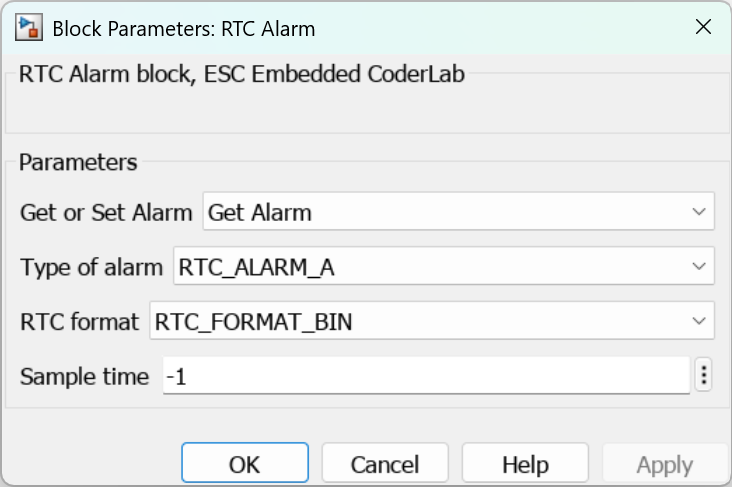
| Get or Set Alarm | Selects the active operational mode for the RTC Alarm block interface:Set Alarm – writes a custom configuration profile down to the RTC hardware.Get Alarm – reads the current baseline configuration back from the RTC hardware. |
| Type of alarm IRQ | Specifies the target hardware interrupt routing channel category:RTC_ALARM_A – main Alarm A pipeline channel used to schedule events or trigger hardware wakeup wakeups.RTC_ALARM_B – auxiliary Alarm B pipeline channel running asynchronously and fully independent of Alarm A.RTC_WAKEUP – high-efficiency cyclic Wake Up timer channel. |
| RTC format | Determines the raw encoding schema parsed across data paths:RTC_FORMAT_BIN – conventional standard binary standard integer parsing format.RTC_FORMAT_BCD – Binary-Coded Decimal notation schema; individual digits are isolated into discrete 4-bit nibbles. |
| Sample time | Specifies the software cyclic refresh execution update interval for the block. |
CubeMX Configuration for a Given MCU Model
The baseline hardware peripheral setup required for the RTC is detailed in the dedicated CubeMX Configuration for a Given MCU Model subpage.
See Also
Last updated on